
AI meeting note tools have become standard in most project teams. But the difference between a tool that actually saves you time and one that creates more work -- editing bad summaries, tracking down missed action items -- is significant.
This comparison focuses on what matters most for project managers: how well each tool captures action items, how useful the summaries are for project documentation, and how well the output integrates into the rest of your project workflow.
The PM Use Case
Project managers use meeting tools differently than other professionals. The outputs that matter most are:
- Action items: Who owns what, by when. These are the things that cannot be missed.
- Decision log: What was decided, not just discussed. Critical for retrospectives and audit trails.
- Status summary: A brief of current project state that can be shared or filed.
- Stakeholder briefs: Often, a PM needs to send a summary to someone who was not in the meeting.
The ideal meeting AI for PMs does not just transcribe -- it structures the output around project delivery.
Otter.ai: Best for Real-Time Capture and Collaboration
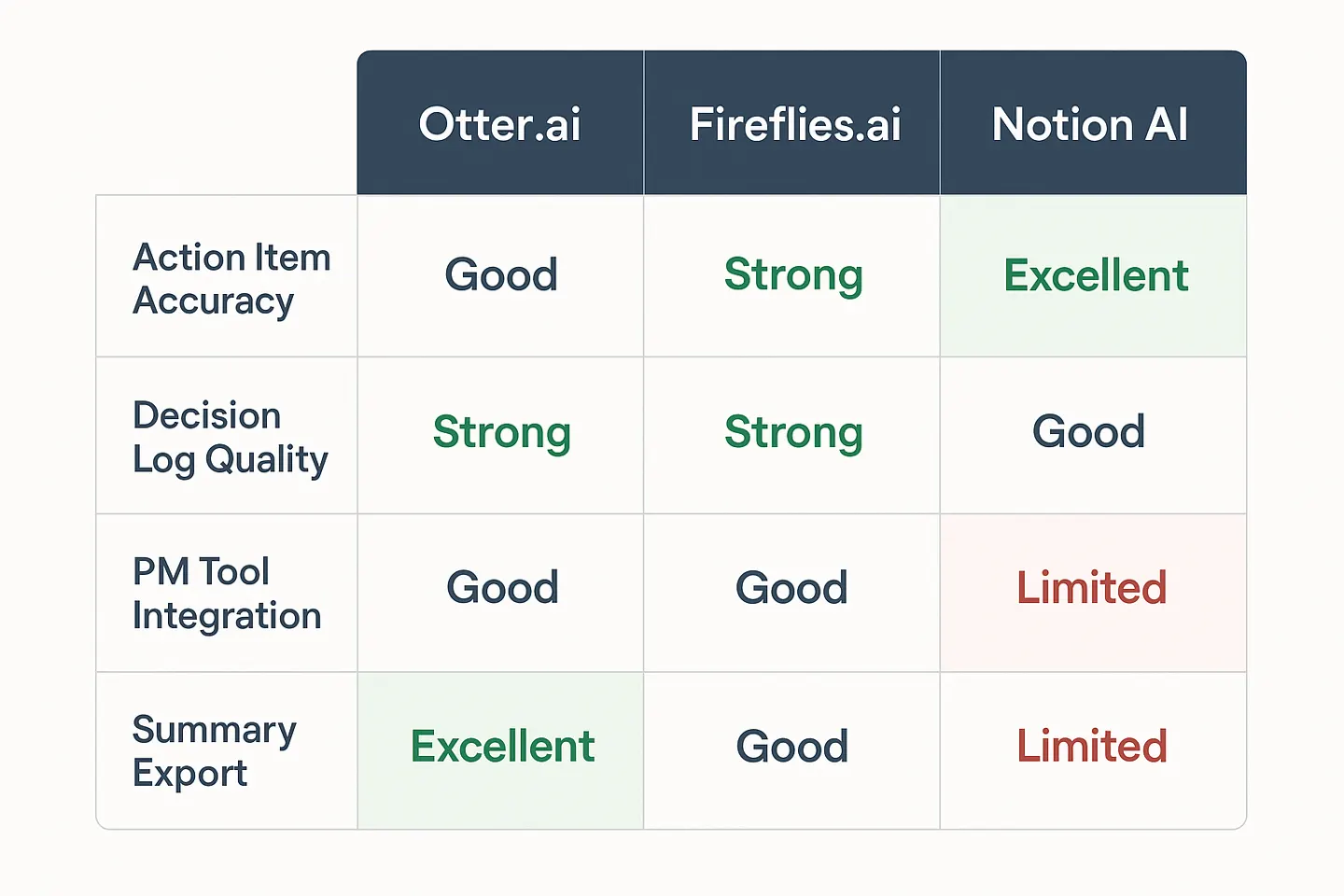
Otter is the most mature tool in this category and has the best real-time transcription experience. Summaries appear as the meeting is still happening, which is useful when you need to flag something quickly without disrupting the flow.
What it does well for PMs:
- Action item extraction is reliable for clearly stated items ("John will send the contract by Friday")
- The "highlight" feature lets you flag key moments in real time
- Otter's integration with Teams, Zoom, and Google Meet is seamless and requires minimal setup
- The shared notebook view works well for teams where multiple people need to annotate the transcript
What it misses:
- It does not distinguish well between decisions and discussion -- you may get a "decisions" section that includes things that were discussed but not decided
- The summary format is generic and not oriented toward project documentation (no RAG status, no milestone tracker)
- Action items require manual cleanup when ownership is implicit rather than explicitly stated in the meeting
Best for: Teams with high meeting volume who need a reliable transcription and action capture tool, and where someone will manually format the output for project documentation.
Pricing: Free tier available (limited minutes); Business plan from ~$20/user/month.
Fireflies.ai: Best for CRM Integration and Sales-Oriented Teams
Fireflies is excellent at what it was built for: capturing structured meeting data for CRM workflows, call coaching, and team accountability. For project managers whose work intersects heavily with sales or customer success, it is very strong.
What it does well for PMs:
- "Action items" and "topics" are extracted into well-organized sections
- The Trello and Asana integrations can push action items directly to your project tracker (requires configuration)
- Fireflies Spaces allows teams to create searchable archives of meeting notes by project or topic
What it misses:
- The AI summary quality varies significantly by meeting type. Internal project meetings with multiple technical voices and cross-talk tend to produce lower-quality summaries than structured calls.
- The output is built around CRM categories (next steps, competitors, pricing) that do not map cleanly to project documentation needs
- Requires more configuration than Otter to be useful out of the box for PM workflows
Best for: PMOs or delivery teams that work closely with sales or customer success and need meeting notes to flow into CRM tools. Also strong for teams that run structured check-ins and need an archivable meeting record.
Pricing: Free tier available (limited transcripts); Pro plan from ~$18/user/month.
Notion AI: Best If Notion Is Already Your Project Hub
Notion AI's meeting notes feature is different from Otter and Fireflies because it works inside Notion rather than as a standalone tool. If your team already uses Notion for project documentation, the integration is genuinely useful.
What it does well for PMs:
- Meeting notes land directly in Notion, where they can be linked to project pages, sprint boards, and decision logs without copying and pasting
- Notion AI can summarize a meeting note and extract action items in one click, formatted as a Notion task database if you have templates set up
- For teams that already have a Notion project structure, the workflow is extremely low-friction
What it misses:
- Notion AI meeting notes require either a Notion AI add-on ($10/user/month) or manual import of transcripts from another tool -- it does not natively join Zoom or Teams calls without an integration setup
- If your team does not already use Notion extensively, the setup cost is higher than starting with Otter or Fireflies
- The transcription quality depends on the source; Notion AI works best with imported transcripts rather than native recording
Best for: Teams already using Notion as their project management hub who want meeting notes to live in context with other project documentation.
Pricing: Notion AI add-on ~$10/user/month on top of Notion plan.
Which Tool Should You Use?
| Use Case | Best Tool |
|---|---|
| High meeting volume, multiple people need transcript access | Otter |
| Meetings that generate CRM actions (customer-facing PM work) | Fireflies |
| Team already uses Notion for project documentation | Notion AI |
| Need Trello or Asana push from meeting action items | Fireflies |
| Lowest-friction setup for standalone use | Otter |
| Full project context integration | Notion AI |
What the PM Must Check Manually
All three tools will miss implicit action items -- the kind that emerge from a conversation but are never explicitly stated. "Let's loop back on that" does not become a named action item. "Can you check with the vendor?" requires you to supply the owner.
Before sharing any AI-generated meeting summary in a project context: read the action items and ask, "Is the owner named? Is the due date specific? Is the dependency clear?" If any answer is no, fix it before the note goes anywhere.
AI for Project Managers at Indigo.pub -- practical intelligence for delivery teams navigating the AI era.
Evaluating AI meeting tools for your team? Use the free AI Tool Risk Evaluator to assess any AI tool against PM-specific criteria before you recommend it to your organization. Takes five minutes. Try the evaluator →
Practical AI intelligence for project managers. Weekly, free. Frameworks, tools, and decisions that help you stay ahead of AI adoption on your projects. No hype. No filler. Subscribe free →