

AI agents have moved out of the AI-specific tools and into the project management platforms most teams already use every day.
Wrike, ClickUp, and Monday.com have all shipped agent-level features in early 2026 -- not just AI writing assistants, but features that take autonomous actions inside your workspace: updating task statuses, surfacing blockers, drafting project updates, and running conditional workflows.
This is a different kind of AI integration than what came before. Here is what changed, why it matters for project teams, and what you should actually do about it.
What Happened
Wrike shipped its "Wrike AI Agent" in Q1 2026, giving users the ability to configure agents that monitor project health and escalate anomalies automatically. The agent can be configured to flag tasks that are overdue and not yet assigned, identify bottlenecks across workstreams, and summarize cross-project risks for steering committees.
ClickUp released ClickUp Brain v2 with deeper workflow automation -- including the ability to create tasks, assign them based on workload, and draft standup summaries from task activity without manual input.
Monday.com expanded its AI features to include formula assistance, automated status rollups, and an early-access AI workflow builder that allows non-technical users to configure conditional logic in plain language.
These are not the same as asking an AI to draft a message in the tool. These features take actions.
When This Happened
These updates shipped across Q1 and early Q2 2026. Wrike's agent capabilities went to general availability in February. ClickUp Brain v2 launched in March. Monday's AI workflow builder is still in early access as of May 2026.
Why PMs Should Care
The platforms you already manage now have the ability to act on your data without you explicitly asking. That is useful and risky at the same time.
Useful: if the agent flags a task that has been sitting for five days with no owner, that is a blocker you might not have caught until the next standup.
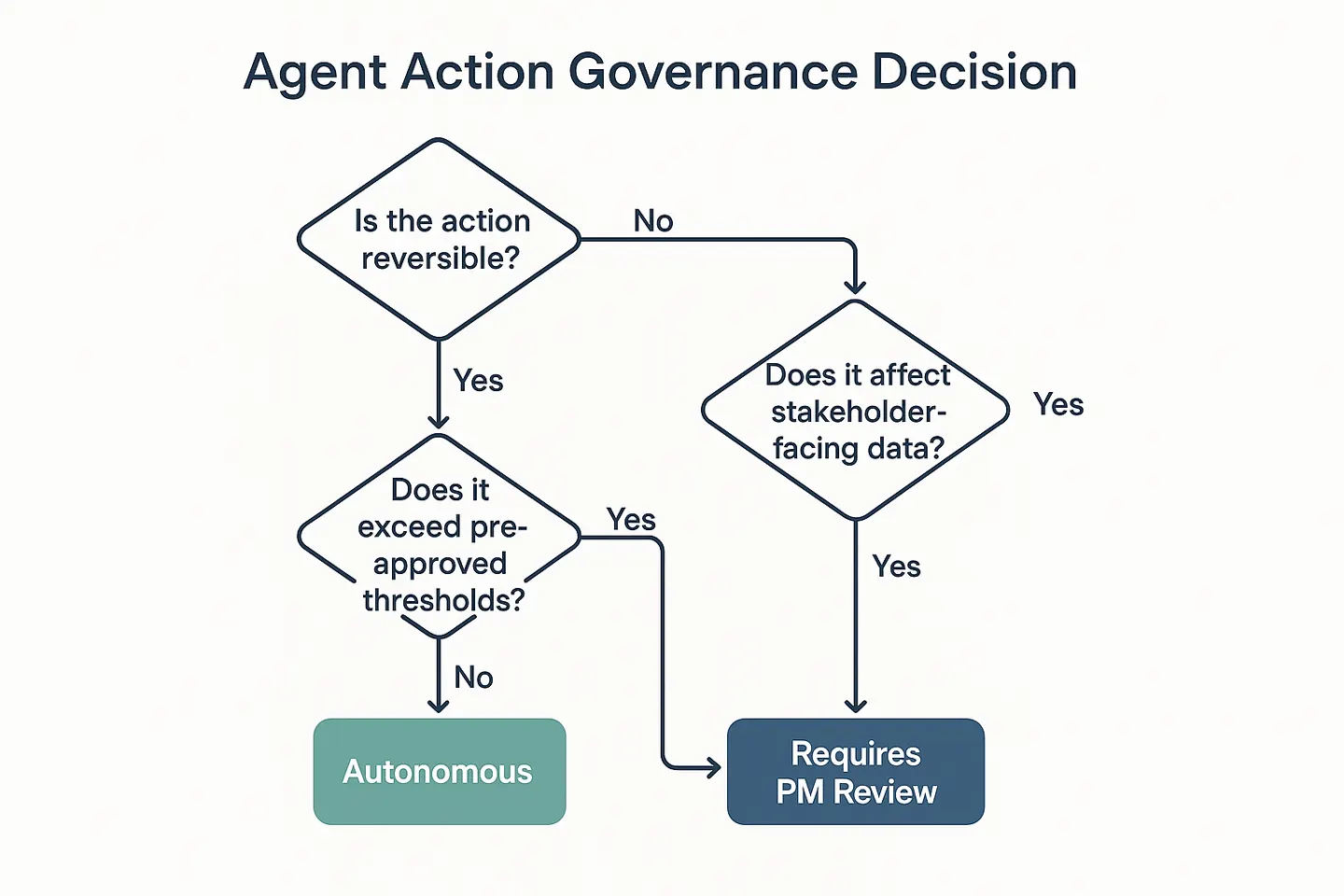
Risky: if the agent automatically reassigns tasks or sends updates on your behalf, those actions have real consequences. A task reassignment that bypasses a person's existing workload can cause confusion. An automated status summary that goes to a stakeholder before you have reviewed it can set wrong expectations.
The PM implication is straightforward: you need to know what your tools are doing on your behalf.
What to Test This Week
If your team uses Wrike, ClickUp, or Monday:
- Open the AI or automation settings in your workspace. Look for anything labeled "agent," "AI workflow," or "automatic actions."
- List every automated action that is currently enabled. If you did not set it up, find out who did and what it is configured to do.
- Pick one low-risk workflow to test the agent on -- something like surfacing overdue tasks from the last week. Run it. Review the output before it goes anywhere.
The goal is to understand what is running before you rely on it.
What to Watch
The trajectory here is toward agentic PM tools that take more actions with less human review. Over the next six months, expect:
- More tools adding "agent" as a layer on top of existing automation
- Agent actions becoming harder to audit after the fact (the action happened; the log entry may not explain why)
- The line between "AI suggestion" and "AI action" blurring significantly
This is not a reason to avoid these features. It is a reason to understand them before they run unsupervised.
Practical Next Step for Project Teams
Have a five-minute conversation at your next standup: "Does anyone know if we have AI agents or automations running in our project tools that we have not explicitly reviewed?" The answer is often yes -- and often nobody is sure what they are doing.
That conversation takes five minutes. Finding out after the fact that an agent sent a status report to your sponsor can take much longer to recover from.
AI for Project Managers at Indigo.pub -- practical intelligence for delivery teams navigating the AI era.
Not sure whether to trust the AI agents running in your PM tools? Use the free AI Tool Risk Evaluator to assess governance and workflow risks before deploying any AI feature in your delivery system. Takes five minutes. Try the evaluator →
Practical AI intelligence for project managers. Weekly, free. Frameworks, tools, and decisions that help you stay ahead of AI adoption on your projects. No hype. No filler. Subscribe free →